Loading...
Searching...
No Matches
Photopeak fitting
Table of Contents
Fit gamma-ray spectral photopeaks with a composable model. Two backends are provided with identical APIs and result types so call sites can swap one for the other.
Backends
- FittingUtils — TF1 + ROOT::Math::Minimizer (Minuit2), binned chi-squared. Fast, pointwise un-normalized model evaluation.
- RooFitUtils — RooAddPdf of custom RooAbsPdf components, unbinned extended maximum likelihood. The custom PDFs (RooStepShelf, RooLowExpTail, RooLowLinTail, RooHighExpTail) implement doEval() so every NLL pass is vectorized over events rather than dispatching scalar evaluate() calls per event. The CPU doEval paths are OpenMP-parallelized; when built with CUDA support each PDF also includes a __global__ kernel under gpu/ and doEval dispatches to it when RooFit hands it device-resident buffers — see GPU acceleration. Each component PDF still re-normalizes numerically over the fit range per Minuit step, but the per-step cost is amortized. Provides RooFit's full machinery for downstream extensions (e.g. simultaneous fits).
Both classes take the same constructor signature, expose the same Set* flag setters, and return the same FitResult struct. The interactive fit editor is implemented per-backend (InteractiveFitEditor for TF1, InteractiveRooFitEditor for RooFit, and InteractiveSimultaneousFitEditor for multi-channel simultaneous RooFit fits). Saved-parameter files use the .fits extension for the TF1 backend and .roofits for the RooFit backend, so the two can coexist for the same input.
The model
Base model: Gaussian peak + linear or flat background.
Optional components (individually togglable, for semiconductor detectors with segmented electrodes):
- Step function — models events where part of the photon energy escapes the active volume, producing a step-like distribution on the left side of the peak, smeared by the detector resolution.
- Low-energy exponential tail — exponential tail below the photopeak from incomplete charge collection, charge trapping, etc.
- Low-energy linear tail — linear tail component that can capture asymmetric tailing not well described by a single exponential.
- High-energy exponential tail — exponential tail above the photopeak from pileup effects.
Components are tested using a hybrid group-and-prune approach: low-side components (step + both low-energy tails) are enabled as a group, then individually pruned if they do not improve the fit. The high-energy tail is tested independently. A component is kept only if it improves the reduced chi-squared.
Multi-peak fitting: double and triple peak variants with all components enabled by default, and constrained fitting using results from previous fits.
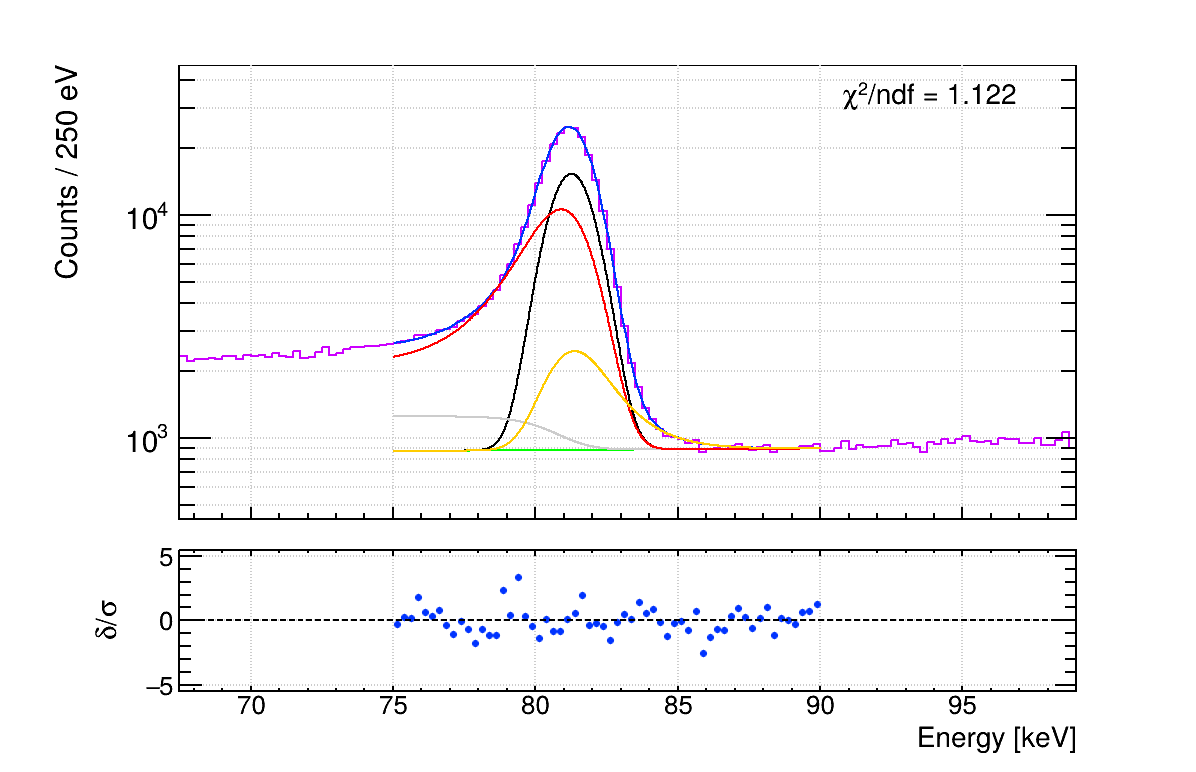
Fit example
Results and diagnostics
All fits produce structured results (FitResult containing PeakFitResult entries) with parameter values, errors, and reduced chi-squared. Failed fits return -1 for all parameters.
FitSimultaneous additionally populates Minuit2 / RooFitResult diagnostics on each returned FitResult so downstream code can distinguish a true minimum from a local or failed solution:
- fit_status (Minuit migrad status, 0 = success) and cov_qual (0 = Exact, 1 = NotPositiveDefinite, 2 = Approximate, 3 = External)
- edm (estimated distance to minimum) and min_nll (minimized negative log-likelihood), with has_fit_diagnostics flagging whether they are meaningful
- parameter_diagnostics — one FitParameterDiagnostic per fitted RooRealVar carrying the value, error, limits, and near-limit flags (set when a parameter sits within a small margin of its bound)
Single-channel fits (both backends) leave these fields at their sentinel defaults. Reduced chi-squared is displayed on fit plots by default. Individual peak components are plotted summed with the background for readability, and multi-peak fits use distinct line styles per peak.
Backend-specific notes for RooFitUtils
- Input is an event-level std::vector<Double_t> plus a display bin width (used only for plotting and the post-hoc reduced chi-squared used for component pruning). A static LoadEventsFromTree helper extracts events from a ROOT TTree branch. The fit itself never bins.
- Amplitude/yield semantics: gaussian, step and tail "amplitude" fields in PeakFitResult carry RooFit yields (event counts) rather than peak heights. This is internally consistent for constrained fits because the ratio component_amplitude / gaus_amplitude is the same quantity in both backends.
- The low-energy linear tail factor (1 + s·(x-μ)) is floored at zero to keep the PDF non-negative as required by RooFit normalization. The TF1 backend has no such constraint.
- RooRealVar::enableSilentClipping() is enabled so observable values outside the current range are silently clipped rather than throwing.
- CPU vs CUDA backend: by default fitTo() calls dispatch through RooFit::EvalBackend::Cpu(), and the OpenMP-parallelized doEval path handles batched evaluation. When compiled with -DAU_ROOFIT_BACKEND_CUDA=1, BestAvailableBackend() (in RooFitUtils.hpp) returns RooFit::EvalBackend::Cuda() instead, and all four custom PDFs report canComputeBatchWithCuda() = true. See gpu for the nix-flake opt-in.
Interactive fitting
SetInteractive() enables a GUI editor that opens after the automated fit completes. The editor shows the histogram, total fit, and individual components with a residual (pull) panel marked by dashed ±3σ guide lines, all updating in real time as parameters are adjusted via sliders and number entries. A fit range slider allows adjusting the fit range visually; for the RooFit backend the display histogram is rebuilt from the underlying events whenever the range changes, so binning follows the zoom in real time (the fit itself remains unbinned). Parameters can be fixed/freed via checkboxes, and a Refit button runs the underlying minimizer with the current values as initial guesses. Live chi-squared is displayed on the plot.
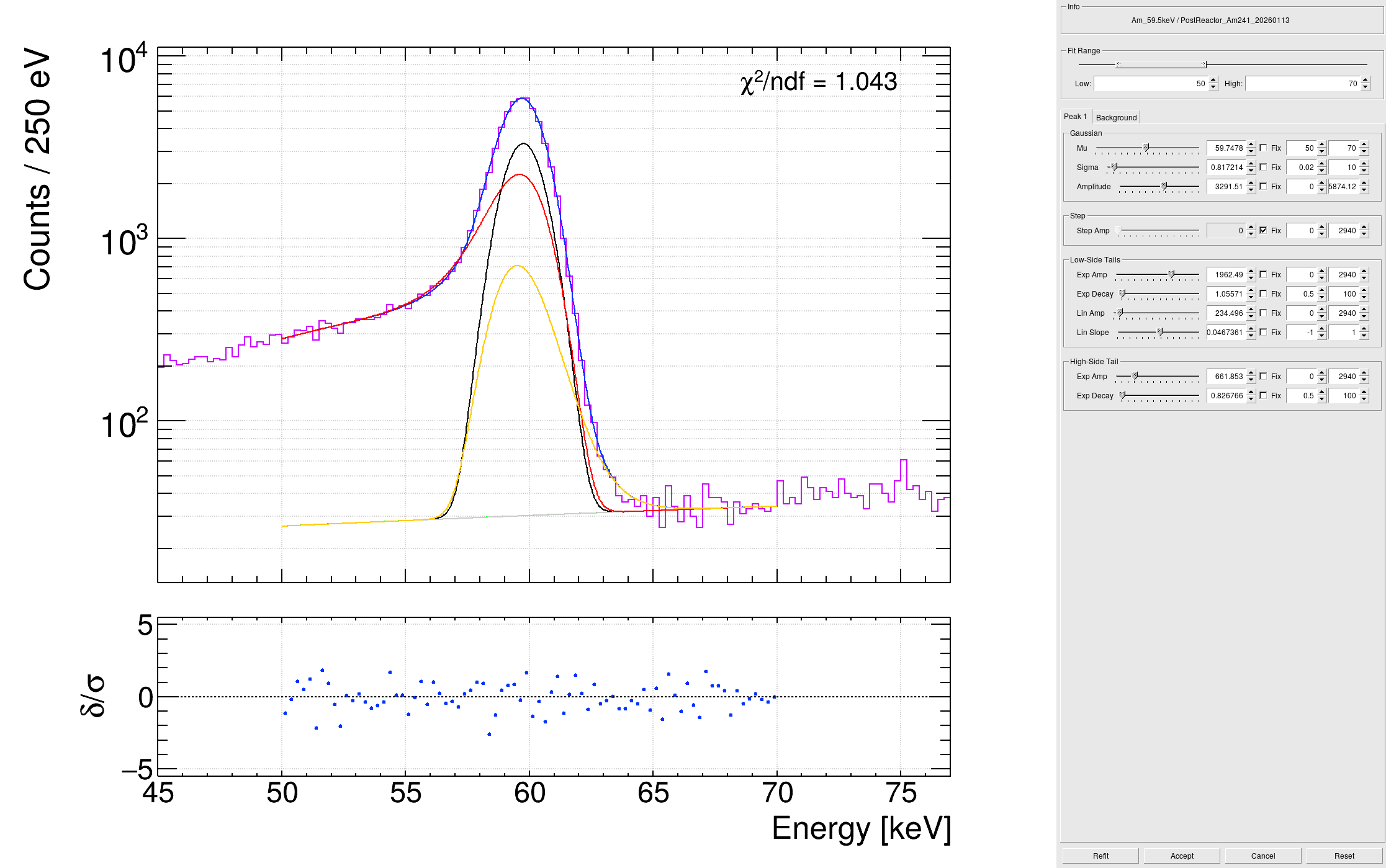
Interactive fit editor GUI
On accept, parameters and fit range are saved to a .fits (TF1) or .roofits (RooFit) file in the plots/fits/ directory. On subsequent runs with SetInteractive(), saved parameters are loaded automatically and the editor is skipped, so interactive results only need to be produced once. Delete the saved file to redo the interactive fit.
- Note
- It is recommended to re-run the fitting macro after an interactive session, as the saved parameters serve as much better starting points for the minimizer and often produce a lower chi-squared on the second pass.
Batch mode is temporarily disabled for the editor window and restored afterward, so plot popups are not affected.
Simultaneous multi-channel fits
Construct a RooFitUtils with the default constructor to put it in simultaneous mode, then register channels and run one joint extended-likelihood fit across all of them. A channel is one spectrum (its own events, fit range, peaks, and background) sharing a single observable with the others.
- AddChannel(name, events, fit_range_low, fit_range_high, display_bin_width_kev, num_peaks, mu_inits, ...) — adds a channel. The component flags (use_flat_background, use_step, use_low_exp_tail, use_low_lin_tail, use_high_exp_tail) match the single-channel model, plus the per-channel locking options below.
- LinkParameter(target, source) / LinkPeakShape(target_channel, target_peak, source_channel, source_peak) — tie a parameter (or a peak's whole shape) in one channel to another so they are fit as a single shared degree of freedom.
- SeedChannel(channel_name, result) — supply a prior single-channel FitResult as starting values for that channel.
- FitSimultaneous(input_name, base_label) — builds the RooSimultaneous, applies the locks, and returns one FitResult per channel. With SetInteractive() the simultaneous editor opens after the automated fit, and accepted parameters are saved/reloaded as for the single-channel editors.
- DumpChannelCSV(channel, base_path, npts = 1000) — read-only export of a converged channel for external plotting: writes <base>_spectrum.csv (per-bin energy, data counts, fit total/background, residual pull) and <base>_fitcurve.csv (smooth npts-sample fit overlay). Evaluates the current parameter state and changes no fit state.
- SetFitDebug(kTRUE) — for simultaneous fits, un-suppresses RooFit evaluation errors and prints the seed NLL so an invalid-NLL failure names the offending PDF. Off by default.
Per-channel locking options
All optional, on AddChannel:
- mu_fixed — per-peak std::vector<Bool_t>; where kTRUE, that peak's centroid is held at its mu_inits value instead of floating.
- bkg_yield_fixed / bkg_slope_fixed — hold the channel's background yield and/or slope constant.
- lock_shape_after_seed — after seeding, fix sigma, the gaussian yield, and every tail/step shape parameter so only peak positions and normalizations float.
- shape_lock_per_peak — per-peak std::vector<Bool_t> refining lock_shape_after_seed: when non-empty, entry i controls whether peak i's shape is locked (when empty, all peaks lock, as before).
- use_step_per_peak — per-peak std::vector<Bool_t> overriding the channel-level use_step for individual peaks (e.g. a step on some peaks but not on another peak sharing the channel).
References
- Boggs SE, Pike SN. Analytical fitting of gamma-ray photopeaks in germanium cross strip detectors. Experimental Astronomy. 2023;56(2-3):403-420. doi: 10.1007/s10686-023-09914-8.
- Longoria LC, Naboulsi AH, Gray PW, MacMahon TD. Analytical peak fitting for gamma-ray spectrum analysis with Ge detectors. Nuclear Instruments and Methods in Physics Research A. 1990;299(1-3):308-312. doi: 10.1016/0168-9002(90)90797-A.